
Important: This documentation is about an older version. It's relevant only to the release noted, many of the features and functions have been updated or replaced. Please view the current version.

Alert notification templating
You can provide detailed information to alert notification recipients by injecting alert query data into an alert notification. This topic explains how you can use alert query labels in alert notifications.
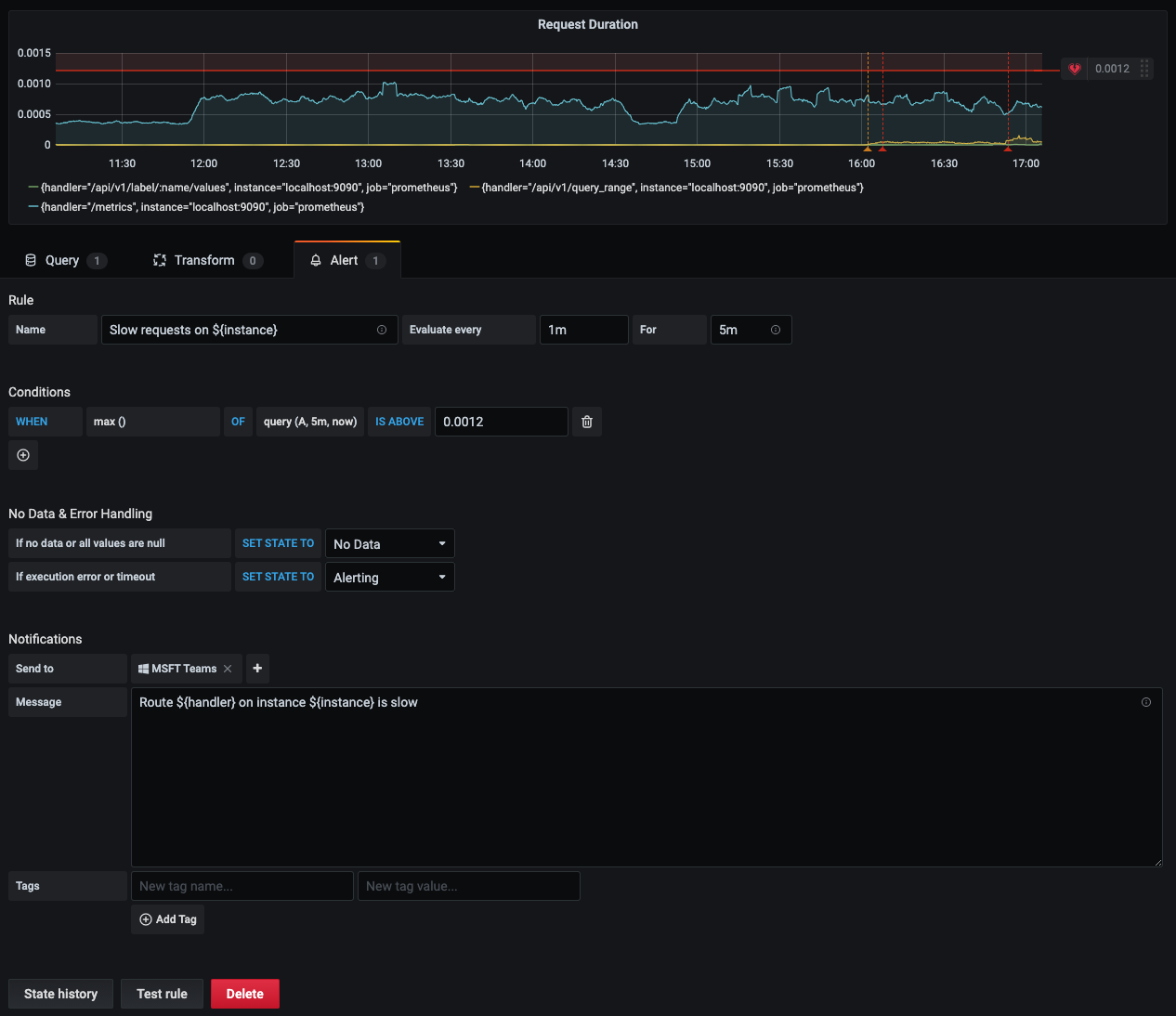
Labels that exist from the evaluation of the alert query can be used in the alert rule name and in the alert notification message fields. The alert label data is injected into the notification fields when the alert is in the alerting state. When there are multiple unique values for the same label, the values are comma-separated.
This topic explains how you can use alert query labels in alert notifications.
Adding alert label data into your alert notification
- Navigate to the panel you want to add or edit an alert rule for.
- Click on the panel title, and then click Edit.
- On the Alert tab, click Create Alert. If an alert already exists for this panel, then you can edit the alert directly.
- Refer to the alert query labels in the alert rule name and/or alert notification message field by using the
${Label}syntax. - Click Save in the upper right corner to save the alert rule and the dashboard.
Was this page helpful?
Related resources from Grafana Labs



