
Important: This documentation is about an older version. It's relevant only to the release noted, many of the features and functions have been updated or replaced. Please view the current version.

Panel options
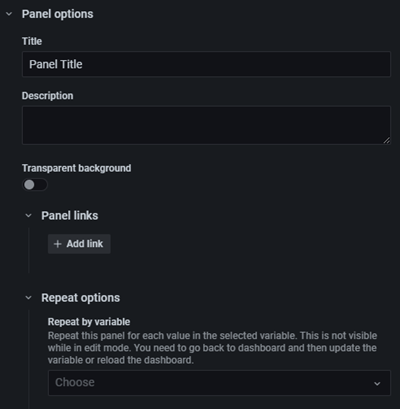
Panel options are common to all panels. They are basic options to add information and clarity to your panels. Fields are described below.
While not required, we recommend that you add a helpful title and description to all panels.
Title
Text entered in this field is displayed at the top of your panel in the panel editor and in the dashboard. You can use variables you have defined in either field, but not global variables.
Description
Text entered in this field is displayed in a tooltip in the upper left corner of the panel. Write a description of the panel and the data you are displaying. Pretend you are explaining it to a new user six months from now, when it is no longer fresh in your mind. Future editors (possibly yourself) will thank you.
You can use variables you have defined in either field, but not global variables.
Transparent background
Toggle the transparent background option on your panel display.
Panel links
For more information, refer to Panel links.
Repeat options
For more information, refer to Repeat panels or rows.
Was this page helpful?
Related resources from Grafana Labs



