
Important: This documentation is about an older version. It's relevant only to the release noted, many of the features and functions have been updated or replaced. Please view the current version.
 Grafana documentation
Panels
Working with Grafana panels
Add a title and description to a panel
Grafana documentation
Panels
Working with Grafana panels
Add a title and description to a panelAdd a title and description to a panel
Add a title and description to a panel to share with users any important information about the visualization. For example, use the description to document the purpose of the visualization.
Before you begin:
To add a title and description to a panel:
Open a panel.
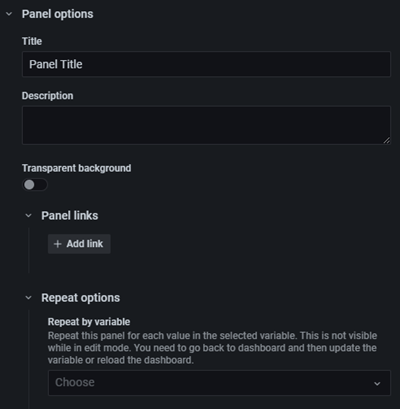
In the panel display options pane, locate the Panel options section.
Enter a Title.
Text entered in this field is displayed at the top of your panel in the panel editor and in the dashboard.
You can use variables you have defined in either field, but not global variables.
Write a description of the panel and the data you are displaying.
Text entered in this field is displayed in a tooltip in the upper left corner of the panel.
You can use variables you have defined in either field, but not global variables.
![]()
Was this page helpful?
Related resources from Grafana Labs



